Demo App: Phase 3 - Building the Frontend Dashboard
We built the frontend tonight in vanilla JS. This was a tricky one for me because of my lack of JavaScript experience. It was great to finally see something in the browser. Seeing it live made me realize some other things I wanted to do with this project, such as building a Terraform provider and creating an example demo for the demo. Claude will cover the session details below, but first a screenshot.
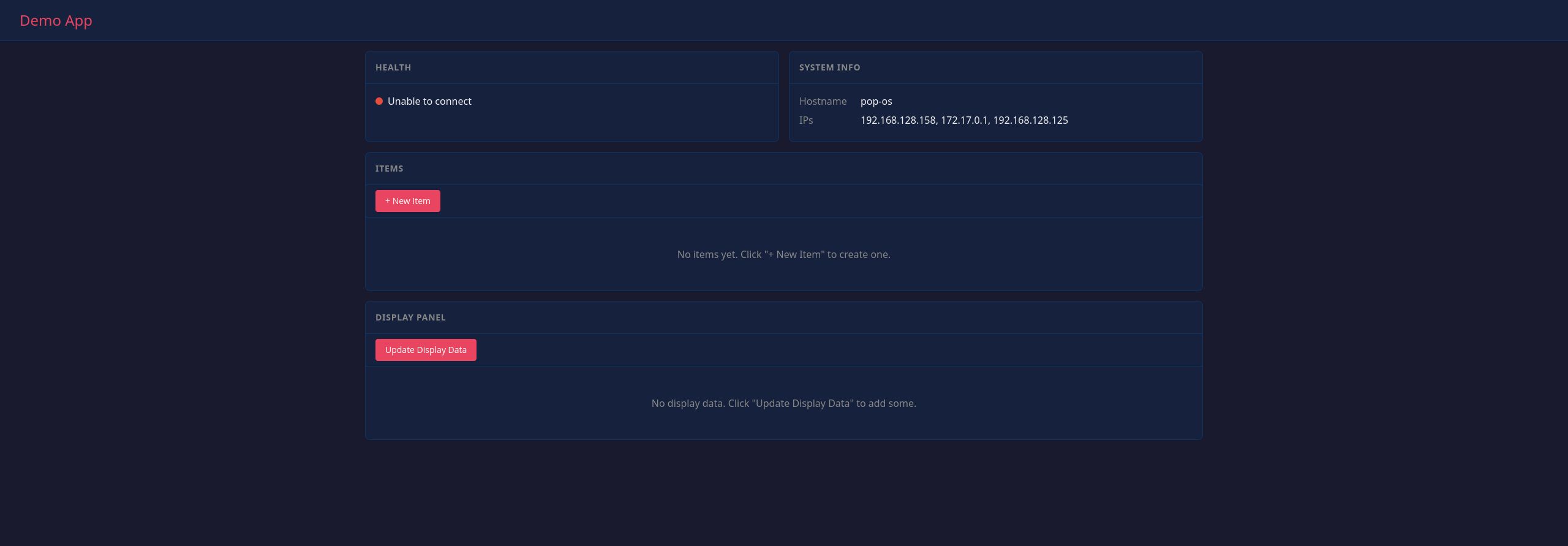
What We Built
A single-page dashboard that ties together all the API endpoints from Phase 2. Four panels showing health status, system info, items, and display data — all updating in real-time.
No React, no Vue, no build step. Just three files:
static/
  index.html    # Page structure
  style.css     # Dark theme layout
  app.js        # All the JavaScript
The Architecture Revelation
Before writing code, we talked through how frontend and backend actually communicate. This was the session where frontend stopped being scary.
The key insight: JavaScript in the browser and Go on the server are completely decoupled. They communicate over HTTP — the same protocol curl uses. The browser makes requests, the server returns JSON. That’s it.
┌──────────────────────────────────────────────────────────┐
│  BROWSER                                                 │
│                                                          │
│  JavaScript calls fetch('/api/items')                    │
│           │                                              │
│           │  HTTP Request                                │
│           ▼                                              │
├──────────────────────────────────────────────────────────┤
│  GO SERVER                                               │
│                                                          │
│  itemsHandler receives request                           │
│  Queries SQLite, returns JSON                            │
│           │                                              │
│           │  HTTP Response                               │
│           ▼                                              │
├──────────────────────────────────────────────────────────┤
│  BROWSER                                                  │
│                                                          │
│  JavaScript receives JSON, updates the page              │
└──────────────────────────────────────────────────────────┘
They could run on different machines. They could be written in different languages. The browser doesn’t know Go exists. The server doesn’t know JavaScript is calling it. This is why REST APIs are universal.
JavaScript Fundamentals
Coming from Python with zero JavaScript experience, here are the patterns that made it click.
async/await: Handling Asynchronous Code
Network requests take time. JavaScript doesn’t block and wait — it keeps running. async/await makes this manageable:
async function fetchHealth() {
    const response = await fetch('/health');
    return await response.json();
}
asyncmarks the function as asynchronousawaitpauses execution until the request completes- Without this, you’d need callbacks or
.then()chains
fetch(): The Browser’s HTTP Client
fetch() is built into every browser. It’s curl for JavaScript:
// GET request
const response = await fetch('/api/items');
const items = await response.json();

// POST request
await fetch('/api/items', {
    method: 'POST',
    headers: { 'Content-Type': 'application/json' },
    body: JSON.stringify({ name: 'New Item' })
});
DOM Manipulation: Updating the Page
The DOM (Document Object Model) is the browser’s representation of the HTML. JavaScript modifies it to update what the user sees:
const container = document.getElementById('health-content');
container.innerHTML = `
    <div class="status">
        <span class="status-indicator"></span>
        <span>${data.status}</span>
    </div>
`;
getElementByIdfinds an element by itsidattributeinnerHTMLreplaces the HTML inside that element- Template literals (backticks) allow embedding variables with
${}
Event Listeners: Responding to User Actions
When a user clicks a button, JavaScript needs to do something:
document.getElementById('add-item-btn').addEventListener('click', handleAddItem);
This says: “When the element with id add-item-btn is clicked, run the handleAddItem function.”
setInterval: Auto-Refresh
The health panel updates every 10 seconds without the user doing anything:
setInterval(refreshHealth, 10000); // milliseconds
This runs refreshHealth repeatedly, forever, every 10 seconds.
Go Side: Serving Static Files
Go needs to serve our HTML/CSS/JS files. Two additions to main.go:
// Serve files from the static directory
http.Handle("/static/", http.StripPrefix("/static/",
    http.FileServer(http.Dir("static"))))

// Redirect root to the dashboard
http.HandleFunc("/", func(w http.ResponseWriter, r *http.Request) {
    if r.URL.Path == "/" {
        http.Redirect(w, r, "/static/index.html", http.StatusFound)
        return
    }
    http.NotFound(w, r)
})
http.FileServer serves files from a directory. http.StripPrefix removes /static/ from the URL before looking up the file, so /static/app.js finds static/app.js on disk.
The Dashboard
Four panels, dark theme, CSS Grid layout:
- Health Panel — Status indicator, timestamp, auto-refreshes every 10 seconds
- System Info — Hostname, IP addresses, environment variables
- Items Panel — Full CRUD with modal dialogs for create/edit
- Display Panel — Pretty-printed JSON, accepts arbitrary data
Everything fetches from the API on page load. The health panel keeps updating to show the app is live. Items can be created, edited, deleted. Display data can be updated with any valid JSON.
Embedding Static Files
Without embedding, you’d need to deploy the binary alongside the static/ folder. Move the binary somewhere else, and the frontend breaks — it can’t find the files.
Go’s embed package bakes files into the binary at compile time:
import (
    "embed"
    "io/fs"
)

//go:embed static/*
var staticFiles embed.FS
That //go:embed comment is a compiler directive. It tells Go: “At build time, read all files matching static/* and store them inside the binary.”
The embedded files preserve their directory structure, so they’re at static/index.html inside the embed.FS. We use fs.Sub to create a sub-filesystem rooted at “static”:
staticFS, err := fs.Sub(staticFiles, "static")
http.Handle("/static/", http.StripPrefix("/static/",
    http.FileServer(http.FS(staticFS))))
Now /static/app.js in the URL maps to app.js in the embedded filesystem.
The result: A 15MB self-contained binary. Copy it anywhere, run it, and the dashboard works. No external files needed.
# Build
go build -o demo-app

# Copy to /tmp (no static folder there)
cp demo-app /tmp/
cd /tmp

# Run it — dashboard works
./demo-app
This is the “single artifact deployment” goal from the original plan.
Phase 3 Complete
- Single-page dashboard
- Health panel with auto-refresh
- System info panel
- Items panel with CRUD
- Display panel
- Embed static files in binary
The frontend is done. One binary, zero dependencies, runs anywhere.