Music Graph Project: UI Enhancements
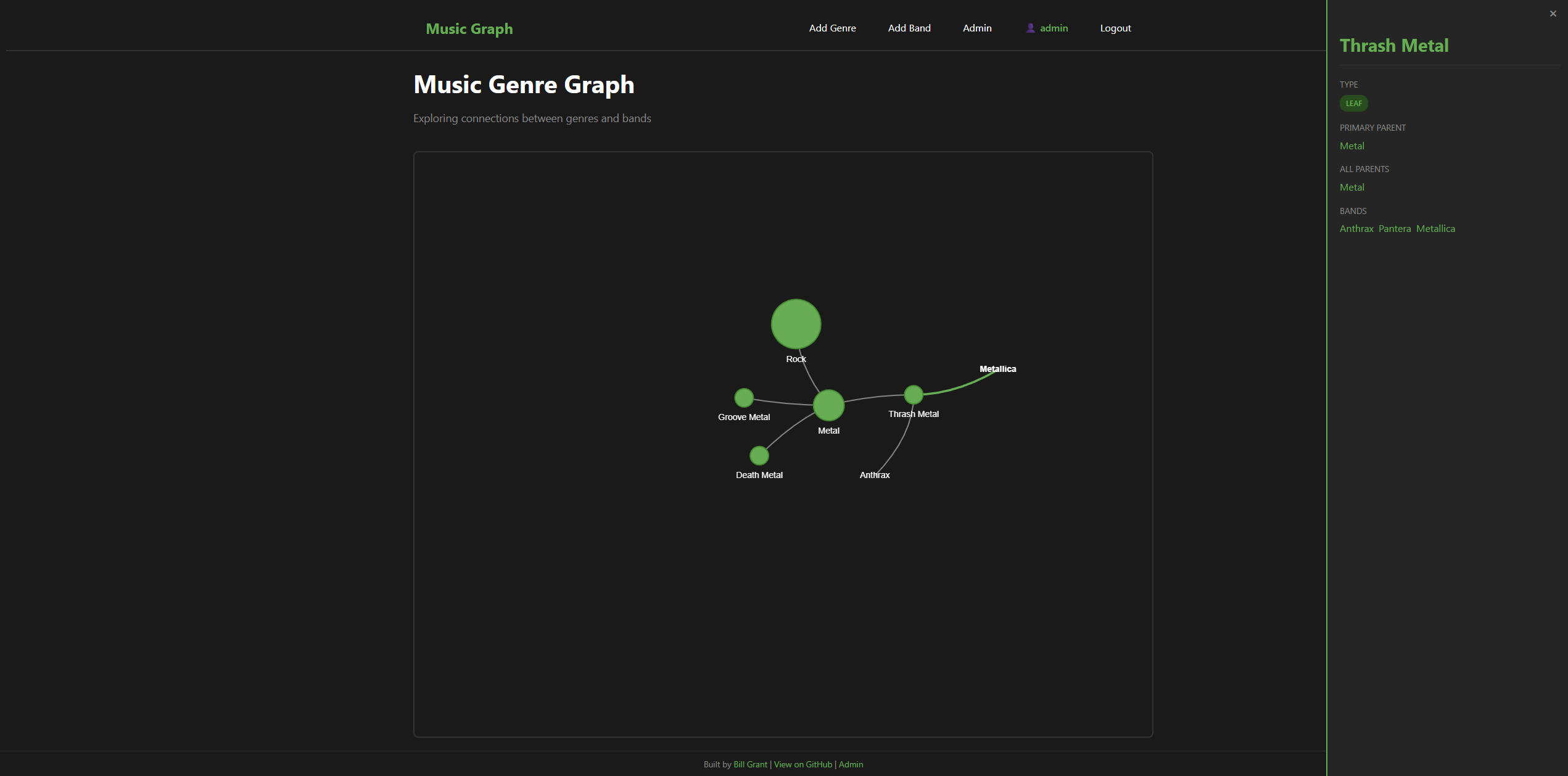
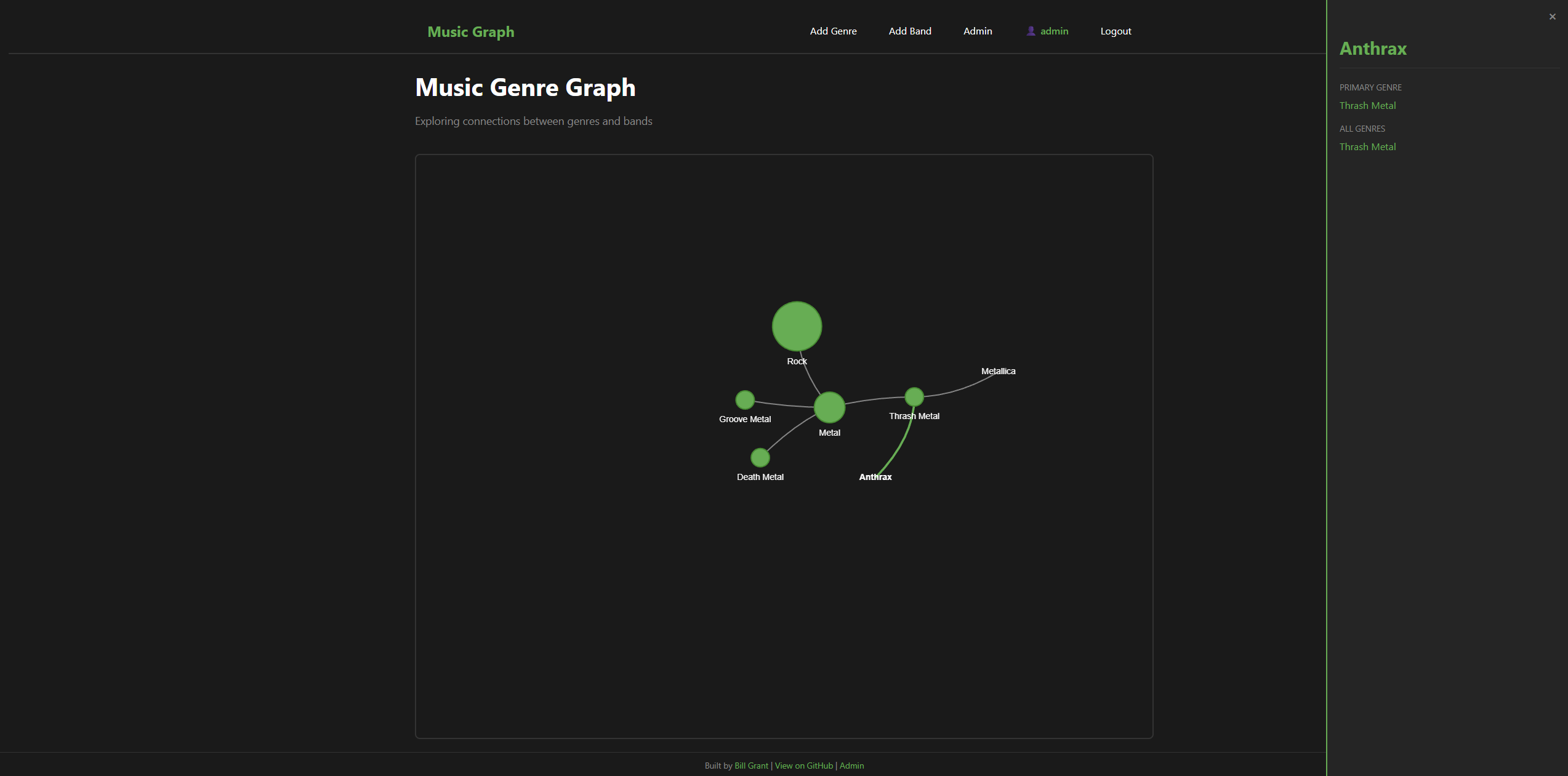
Phase 10 focused on UI improvements - We wanted to display the data that we have have in the database but have been hiding from the user. We created a side panel that pulls out when you click on band or a genre. It will show things like parent genres or in case of a band it will show all of the genres that band belongs too.This was a great Javascript learning experience for me. Claude will tell you the rest
Screenshots
The Problem: Hidden Data
Since Phase 6, the application has stored multiple relationships:
- Bands have a primary genre (shown in graph) and additional genres (stored but hidden)
- Genres have a primary parent (shown in graph) and additional parents (stored but hidden)
Users could only see primary relationships in the graph. All that rich “also belongs to” data was invisible unless you looked at the admin panel.
The Solution: Detail Panel
Clicking any node now opens a slide-in panel showing all relationships:
For Bands:
- Primary genre (clickable)
- All genres the band belongs to
For Genres:
- Type badge (root/intermediate/leaf)
- Primary parent
- All parent genres
- Child genres
- All bands in this genre
Clicking any link in the panel navigates the graph to that entity and updates the panel - you can explore the entire graph without leaving the visualization.
Design Decision: Generic vs Entity-Specific
We had two implementation options:
Option 1 (Chosen): Generic Panel System One renderer that handles any entity type based on a data structure:
var entityData = {
    bands: {
        'pantera': {
            name: 'Pantera',
            fields: [
                { label: 'Primary Genre', value: 'Groove Metal', link: 'groove-metal' },
                { label: 'All Genres', values: [...], links: [...] }
            ]
        }
    }
};
Option 2: Entity-Specific Functions
Separate showBandDetails() and showGenreDetails() functions with hardcoded HTML.
We chose the generic approach because:
| Change needed | Generic | Entity-Specific |
|---|---|---|
| New entity type | Data only | New function + HTML |
| New field on entity | Data only | Edit function + HTML |
| New field type | One else-if | Edit ALL functions |
This matters for future growth. When we add band descriptions, Wikipedia links, or Spotify embeds, we add them to the data structure and (maybe) one rendering case - not scattered across multiple functions.
Template Inheritance: DRY Templates
Phase 10 also tackled template duplication. We had 9 templates, each repeating:
- HTML boilerplate
- Navbar (15 lines)
- Flash messages
- Footer
Before: Copy-Paste Everywhere
Every template file started with ~30 lines of identical boilerplate.
After: Jinja2 Inheritance
<!-- base.html -->
<nav class="navbar">...</nav>
{% block content %}{% endblock %}
<footer>...</footer>

<!-- login.html -->
{% extends "base.html" %}
{% block title %}Login{% endblock %}
{% block content %}
<form>...</form>
{% endblock %}
Results:
login.html: 50 → 26 linesadmin.html: 115 → 83 lines- Navbar change: 1 file instead of 9
- Footer now appears on all pages automatically
This is the same inheritance pattern used in Python classes or Terraform modules - define a base, override specific parts.
The JavaScript Learning
This phase hit my #1 learning priority: JavaScript. Key concepts that clicked:
DOM Manipulation:
// Get element, modify its CSS classes
document.getElementById('panel').classList.add('open');
CSS Does the Animation:
.detail-panel {
    right: -400px;  /* Hidden */
    transition: right 0.3s ease;
}
.detail-panel.open {
    right: 0;  /* Visible */
}
JavaScript just toggles the class. CSS handles the smooth slide-in. This separation of concerns (JS = state, CSS = appearance) was new to me.
Building HTML Dynamically:
entity.fields.forEach(function(field) {
    html += '<div class="field">';
    html += '<label>' + field.label + '</label>';
    // ... render based on field type
    html += '</div>';
});
document.getElementById('panel-content').innerHTML = html;
Loop through data, build string, inject into DOM. Simple pattern, but powerful.
UX Refinement: Toggle Behavior
After initial implementation, clicking a genre twice kept the panel open showing the same data. Expected behavior: click to open, click again to close.
The fix was tracking state:
var currentPanelEntity = null;

function showDetailPanel(entityType, entityId) {
    var entityKey = entityType + ':' + entityId;

    if (currentPanelEntity === entityKey) {
        closeDetailPanel();  // Same entity = close
        return;
    }
    // ... show panel
    currentPanelEntity = entityKey;
}
Small change, big UX improvement. This came from actually using the feature and noticing what felt wrong.
What’s Deferred
Issue #16 (graph scalability / progressive disclosure) remains open. The current user (Aidan) likes the chaotic floating graph. When scale becomes painful, we’ll revisit - but not before it’s actually a problem.
What’s Next
Phase 11 will focus on infrastructure modernization:
- Remote Terraform state
- Packer golden images
- Automated dev database sync from production
The “lite” approach continues to work well - ship what’s needed, defer what isn’t.
This post is part of my Music Graph Project series, documenting the journey of building a full-stack application with AI assistance.