Music Graph Project: CRUD Operations and Admin Panel
In this session Claude and I added CRUD operations. This was by far the easiest for me to get through. Meaning that I didn’t ask as many questions or need to step through things line by line. I think it is because the type of Python we were writing is similar to projects I have wrote in past. Below is the post written by Claude with screenshots added by me.
Phase 3 is complete - the application now has full CRUD (Create, Read, Update, Delete) operations. You can add, edit, and delete genres and bands through web forms instead of editing code or database files.
Why CRUD Matters
Phase 2 gave us a database, but no way to interact with it beyond initialization scripts. To make this usable, we needed:
- Forms to add new content
- Ability to fix mistakes or update information
- Safe deletion when needed
- A way to see and manage all data
Now the application is actually usable by non-developers.
Create: Adding Content
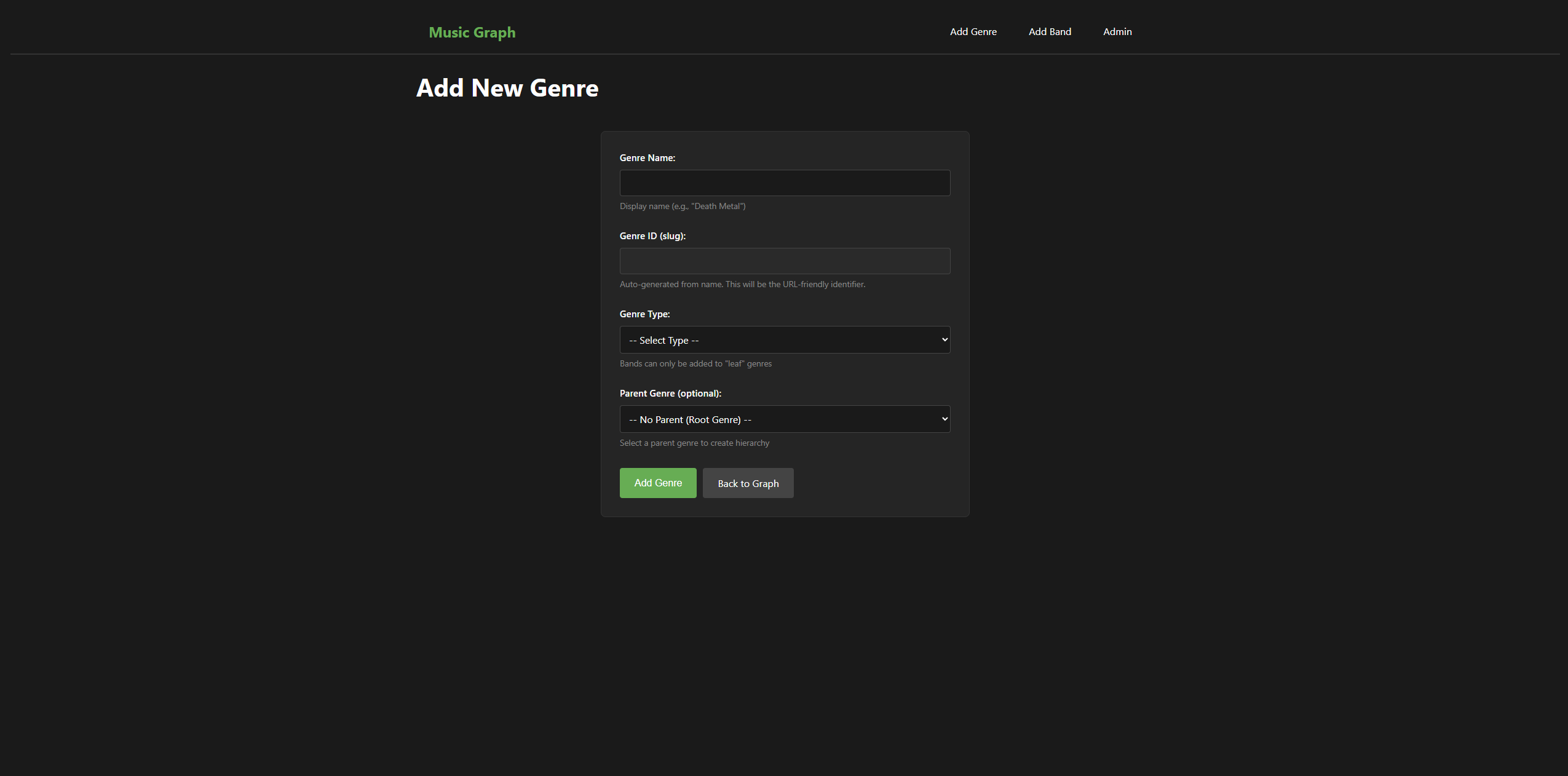
Add Genre Form:
- Auto-generates slug from name (e.g., “Death Metal” → “death-metal”)
- Select genre type (root, intermediate, leaf)
- Choose parent genre for hierarchy
- Validation prevents duplicates and invalid data
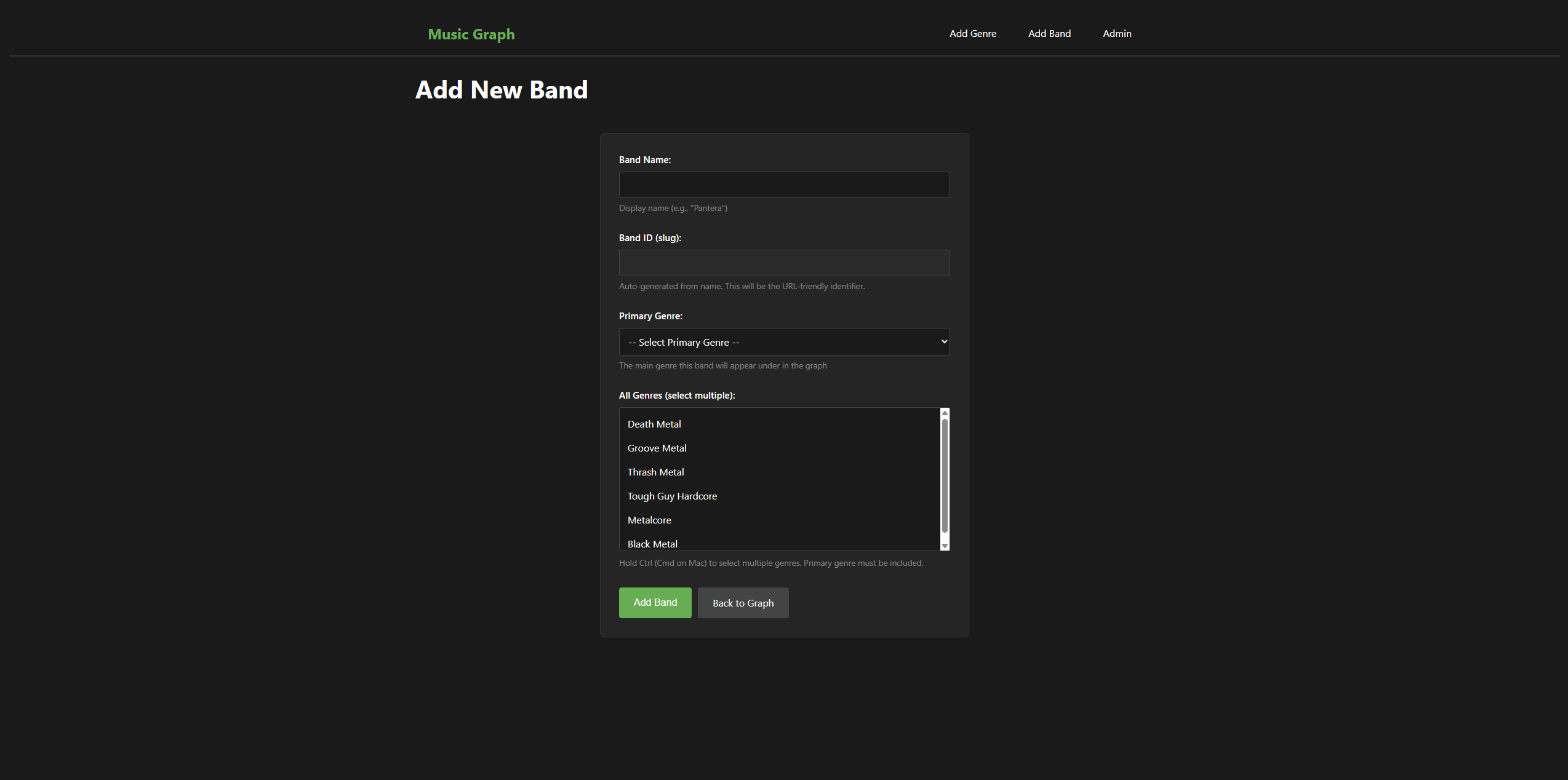
Add Band Form:
- Auto-generated slug
- Select primary genre (shows in graph)
- Multi-select for all genres (metadata)
- Validates that primary genre is included in full list
Key features:
- Slug generation happens in JavaScript as you type
- Read-only slug field (prevents manual editing that could break things)
- Flash messages confirm success or show errors
- Form redirects back to blank form for easy batch additions
Validation Throughout
Every form validates input before touching the database:
Genre validation:
# Check if ID already exists
if Genre.query.get(genre_id):
    errors.append(f"Genre ID '{genre_id}' already exists")

# Validate parent exists
if parent_id:
    parent = Genre.query.get(parent_id)
    if not parent:
        errors.append(f"Parent genre '{parent_id}' does not exist")
Band validation:
# Primary genre must be a leaf
if primary_genre.type != 'leaf':
    errors.append(f"Primary genre must be a 'leaf' genre")

# Primary must be in selected genres
if primary_genre_id not in selected_genre_ids:
    errors.append("Primary genre must be included in selected genres")
Validation errors show as flash messages, and form data is preserved so you don’t have to re-type everything.
Update: Editing Existing Data
Edit forms work like add forms but:
- Pre-populate with existing data
- ID field is read-only (can’t change primary keys)
- Redirect back to same edit page on success
- Additional validation (e.g., prevent genre from being its own parent)
Edit Genre:
@app.route('/edit-genre/<genre_id>', methods=['GET', 'POST'])
def edit_genre(genre_id):
    genre = Genre.query.get_or_404(genre_id)
    # ... validation ...
    genre.name = new_name
    genre.parent_id = new_parent_id
    genre.type = new_type
    db.session.commit()
Edit Band: Similar pattern, but handles the many-to-many genre relationships:
# Update genre relationships
selected_genres = Genre.query.filter(Genre.id.in_(selected_genre_ids)).all()
band.genres = selected_genres
SQLAlchemy handles the junction table updates automatically.
Delete: Removing Content
Delete operations use POST requests (not GET links) to prevent accidental deletion from clicking or bookmarks.
Genre deletion has safety checks:
# Check if genre has children
children = Genre.query.filter_by(parent_id=genre_id).all()
if children:
    errors.append(f"Cannot delete - has child genres: {child_names}")

# Check if bands use this as primary genre
bands_using = Band.query.filter_by(primary_genre_id=genre_id).all()
if bands_using:
    errors.append(f"Cannot delete - primary genre for: {band_names}")
This prevents breaking the hierarchy or orphaning bands.
Band deletion is simpler - no dependencies to check, just delete and update the graph.
Both use JavaScript confirmation dialogs: “Are you sure you want to delete X?”
Admin Panel: Managing Everything
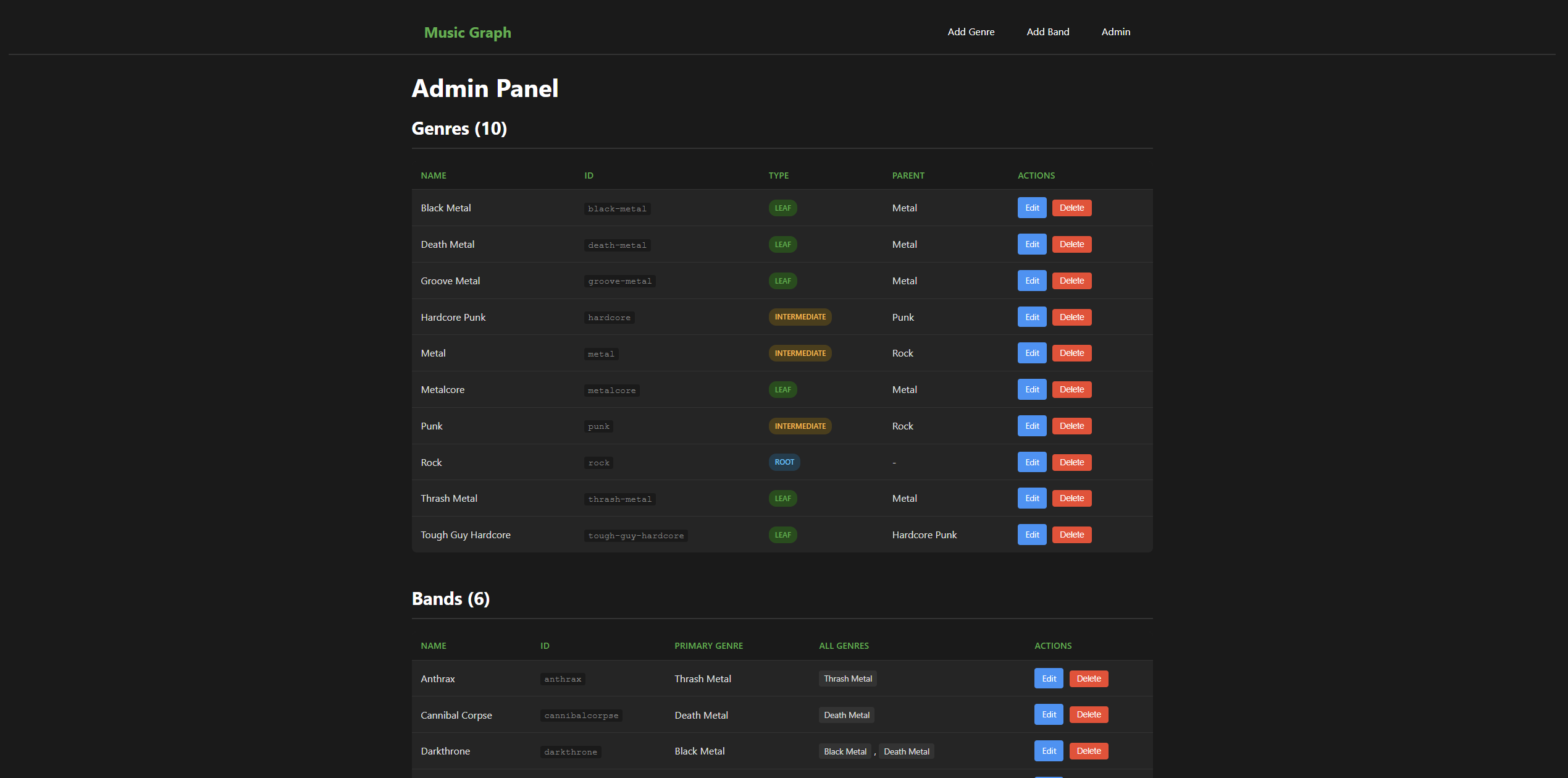
Created an admin view showing all data in tables:
Genres table shows:
- Name and slug
- Type (root/intermediate/leaf) with color-coded badges
- Parent genre
- Edit and Delete buttons
Bands table shows:
- Name and slug
- Primary genre
- All genres (as tags)
- Edit and Delete buttons
This gives you a complete overview and quick access to edit/delete any item.
Navigation
Added a navbar to every page:
- Music Graph (home/graph view)
- Add Genre
- Add Band
- Admin
Everything is now 1-2 clicks away instead of manually typing URLs.
Flash Messages
Implemented Flask’s flash message system for user feedback:
Success messages:
flash(f'Genre "{name}" added successfully!', 'success')
Error messages:
flash(f'Cannot delete - has child genres: {names}', 'error')
Messages are styled (green for success, red for error) and automatically disappear after being displayed once. Much better UX than silent failures or error pages.
What I Learned
Form handling patterns:
- GET request → show form
- POST request → validate → save → redirect
- Preserve form data on validation errors
- Use flash messages for feedback
SQLAlchemy relationships:
- Many-to-many updates are simple:
band.genres = selected_genres - SQLAlchemy handles the junction table automatically
get_or_404()is cleaner than manual existence checks
Frontend/backend coordination:
- JavaScript for UX (auto-slug generation, multi-select help)
- Server-side validation (never trust the client)
- Read-only fields prevent tampering but still show data
Safety first:
- POST for destructive operations
- Validation before database changes
- Safety checks before deletion
- Confirmation dialogs for destructive actions
Current State
The application now has:
- Full CRUD operations for genres and bands
- Admin panel to view and manage all data
- Validation and error handling throughout
- User-friendly forms and feedback
- Navigation between all features
Everything needed for me (and eventually Aidan) to actually use this application.
Screenshots

What’s Next: Phase 4
Authentication - user accounts, login/logout, and protecting CRUD operations so only authenticated users can make changes.
This prepares for:
- Multiple users (me and Aidan)
- Different permission levels (admin vs. contributor)
- Eventually, the Wikipedia-style suggestion workflow
Once authentication is in place, we can deploy to a server and make it accessible beyond localhost.
Code
This release is tagged as v0.2.0-alpha.
This is part of the Music Genre Graph project series. See the project introduction for the full roadmap.